Tips to keep e-mails out of SPAM folder
E-mail looks simple: you enter a sender and the mail goes out. In reality every receiving mail server (Gmail, Outlook and so on) checks whether the server delivering the mail is actually allowed to send on behalf of that sender domain. If not, the mail ends up in spam or does not arrive at all. This page explains how sending from i-Reserve is set up by default, what happens when you enter your own sender address, and which choices you have.
The default setup
For every i-Reserve environment we set up sending through Mailgun, a company specialised in e-mail delivery whose data stays in the EU. This is included in the licence.
Mail is sent from an address on a dedicated subdomain, for example mail@YOURDOMAIN.ireserve.nl. We have fully configured SPF, DKIM and DMARC for that domain, so recipients see a correctly signed message. The sender name can simply be the name of your organisation.
Why "sending from info@yourdomain.com" goes wrong
A common wish is: "I want the mail to come from info@yourdomain.com." Entering that address under Email from takes a second, but the result is that nearly all mail lands in spam. The receiver looks up the DNS of yourdomain.com and finds no permission for Mailgun there. To the receiver it looks as if someone is impersonating your organisation.
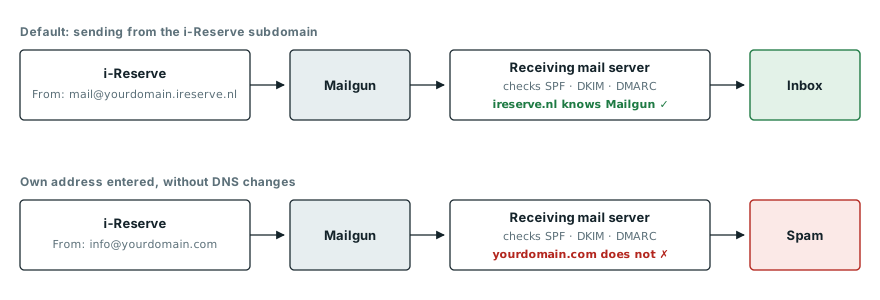
The receiver checks whether Mailgun may send on behalf of the sender domain. For the i-Reserve subdomain that is arranged, for your own domain only after a DNS change.
i-Reserve warns you about this: under Configuration > System > Outgoing e-mail it checks whether the sender address matches the domain sending has been set up for.
Your options
1. Default sending + reply-to (recommended)
You send from the i-Reserve subdomain and set a reply-to address (ReplyTo under Outgoing e-mail). The sender is mail@YOURDOMAIN.ireserve.nl, but when the recipient clicks Reply, the answer goes to the address you choose.
Even stronger is to let replies run through inbound routing. We then set up Mailgun to receive replies on the subdomain and forward them. A guest's reply becomes visible in i-Reserve, at the booking and for the whole team, and also arrives in your own mailbox.
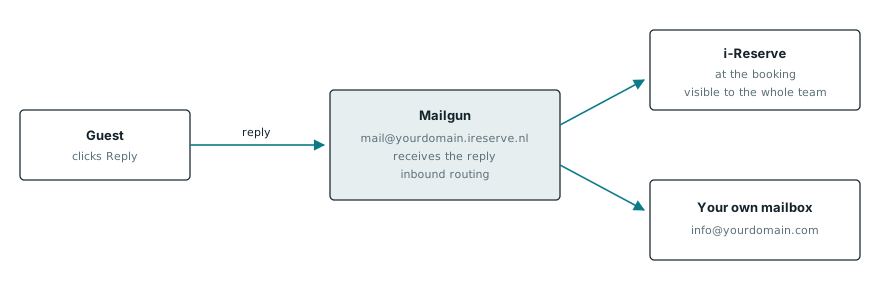
With inbound routing a reply arrives in two places: in i-Reserve at the booking, and in your own mailbox.
- Pro: works immediately, nothing to change in DNS, and delivery is optimal.
- Pro: replies simply reach you, and with routing they also show up in i-Reserve itself.
- Pro: no maintenance on your side. When something changes at Mailgun or the large mail providers, we take care of it.
- Con: the sender address shows the i-Reserve subdomain instead of your own domain. The sender name is still your organisation's name.
2. Validate your own domain through DNS
If you really want to send from info@yourdomain.com, your domain has to authorise Mailgun. We supply a set of DNS records for this (SPF, DKIM and possibly MX and CNAME), and the administrator of your domain enters them. See What changes are needed for sending through Mailgun? for an example.
- Pro: the mail genuinely comes from your own domain.
- Con: you need access to DNS, often through a web agency or hosting provider. That means coordination between several parties.
- Con: it is error-prone. A domain may have only one SPF record, so the existing record has to be extended, not replaced. A wrong MX record can even disrupt your organisation's regular mail.
- Con: it takes more time to set up and verify, and it has to stay correct. Switching mail or hosting provider later can silently remove the records.
3. Your own sending account (own Mailgun, SendGrid or mail server)
An organisation can also choose to handle sending entirely itself, with its own account at for example Mailgun or SendGrid, or through its own mail server. The settings are described in How do I set up outgoing e-mail?.
- Pro: full control over sending, including your own statistics and logs.
- Pro: a good fit for organisations that already have their own sending platform and IT management.
- Con: management, costs and DNS settings are entirely yours. You need the DNS steps from option 2 here as well.
- Con: inbound routing to i-Reserve does not work automatically and has to be set up separately.
Comparison
| 1. Default + reply-to | 2. Own domain via DNS | 3. Own sending account | |
|---|---|---|---|
| Sender address | mail@YOURDOMAIN.ireserve.nl | info@yourdomain.com | info@yourdomain.com |
| DNS change needed | No | Yes | Yes |
| Replies visible in i-Reserve | Yes, with routing | Yes, with routing | Set up separately |
| Risk of errors | Low | Medium to high | High |
| Managed by | i-Reserve | Shared | You |
Our advice
Start with option 1. In practice the recipient hardly notices that the sender address is an i-Reserve subdomain: the mail arrives, carries your name, and a reply reaches you. Only choose option 2 or 3 if your own sender domain is truly needed and someone is available who can manage DNS reliably. In doubt? Contact support and we will think along with you.
Test your sending
Even with the right settings, the content of a mail (template, images, links) can affect delivery. Testing is therefore always wise.
- Send a test mail from Configuration > System > Outgoing e-mail, or send a mail from a booking to yourself and check in the e-mail tab that it was sent.
- Look at the received mail. In Gmail choose Show original, in Outlook View message source. SPF, DKIM and DMARC should show PASS.
- Use an end-to-end tester such as mail-tester.com. It also scores the content and suggests improvements. See Troubleshooting e-mail that often lands in the spam folder.
- Check DNS records (for options 2 and 3) with MxToolbox.
More background on the terms is in What is SPF and what is DKIM?.


